AI & Automation
Automate Your Notion CRM With Claude Code
Learn how to auto-update your Notion CRM with call transcripts, emails, Slack messages, and payments using Claude Code automation.
Daniel Canosa ·
TL;DR: Claude Code can automatically keep your Notion CRM updated by pulling data from call transcripts, Gmail, Slack, and Stripe every day. A three-layer system collects raw data, synthesizes it into client memory files, and writes a current status summary directly into Notion. Total API cost: around $3 a month.
Key Takeaways
- A self-updating CRM is possible today using Claude Code to collect, synthesize, and sync client data from multiple sources into Notion automatically.
- The three-layer system consists of collection (raw data), intelligence (synthesis into a memory file), and synchronization (pushing a status summary to your CRM).
- Data sources include Fathom call transcripts, Gmail threads, Slack messages, and Stripe payments, all of which have APIs you can connect to.
- The running cost is approximately $3 per month in API fees because this task does not require the most expensive models.
- Context is the real asset. Once you have synthesized client context in one place, you can use it for proposals, financial summaries, and lead follow-up nudges, not just CRM updates.
Why My CRM Was Always Out of Date (And What I Did About It)
My Notion CRM was rotting.
Not because I didn't care about it.
Because updating it manually just kept slipping.
I'd finish a call, have a clear picture in my head of where things stood with a client, and then just... not open Notion.
Days would pass.
My team would go in, see information that was two weeks old, and have no idea what was actually happening.
Honestly, the information existed.
It was in the Fathom transcript from the call.
It was in the email thread from that morning.
It was in the Slack messages we had exchanged.
The only problem was that it was scattered everywhere and nobody was connecting the dots.
So I built a system in Claude Code that does that connecting automatically, every day, without me touching it.
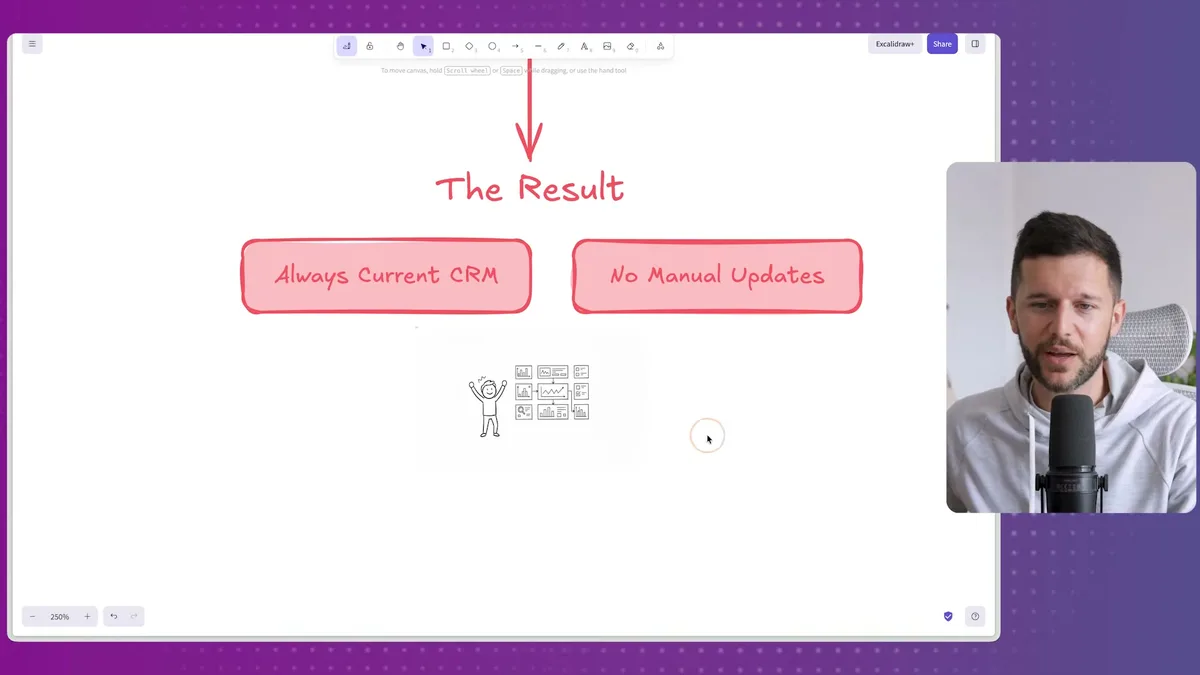
The result is a Notion CRM that shows me exactly where every lead stands, what we're waiting on, and what the last action was, without any manual input from me or my team.
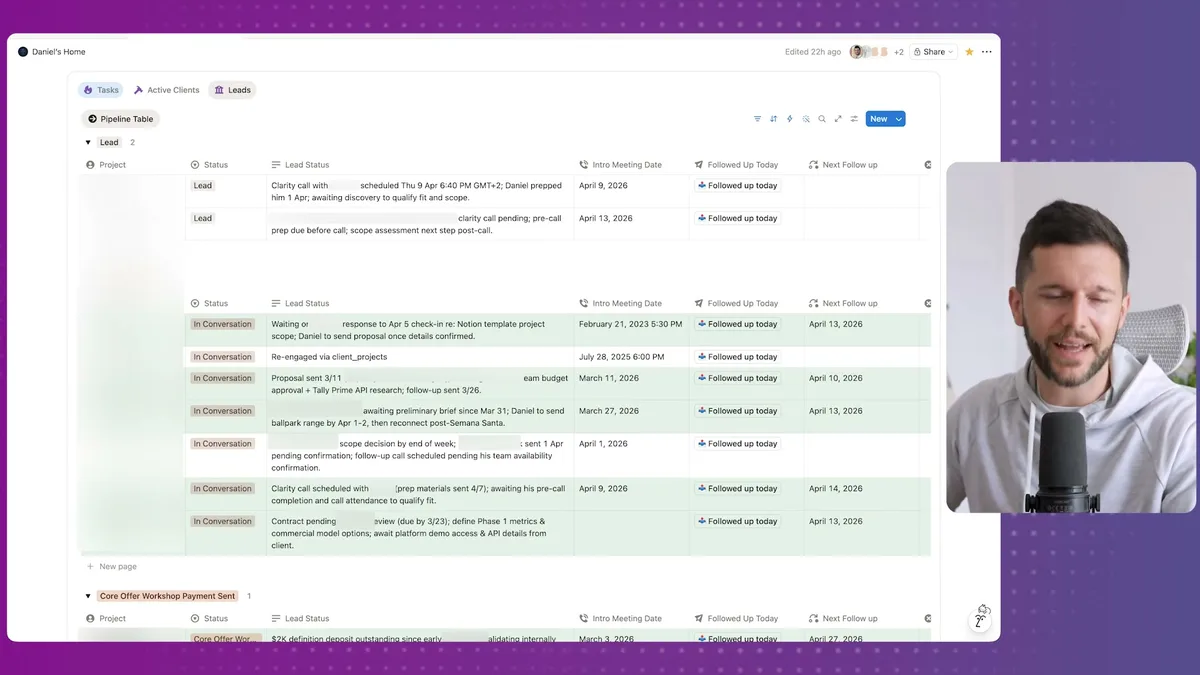
This is my actual CRM, not a demo.
A lot of the details are blurred for privacy, but you can see what it gives me.
One lead has a proposal sent on March 11th, awaiting budget approval from the client's team.
Another is waiting on a scope decision by end of week.
Another is waiting on the client's response to a check-in I sent on April 5th.
That is the real status of real deals, and I did not type a single one of those updates manually.
Bear in mind, this is not just about saving me ten minutes a day.
When a CRM is always current, your whole team is working from the same reality.
That changes how you run client conversations, how you delegate, and how you catch leads before they go cold.
The Three-Layer System That Makes It Work
The system has three distinct layers, each doing a specific job.
Understanding the separation matters because each layer can be swapped or upgraded independently.
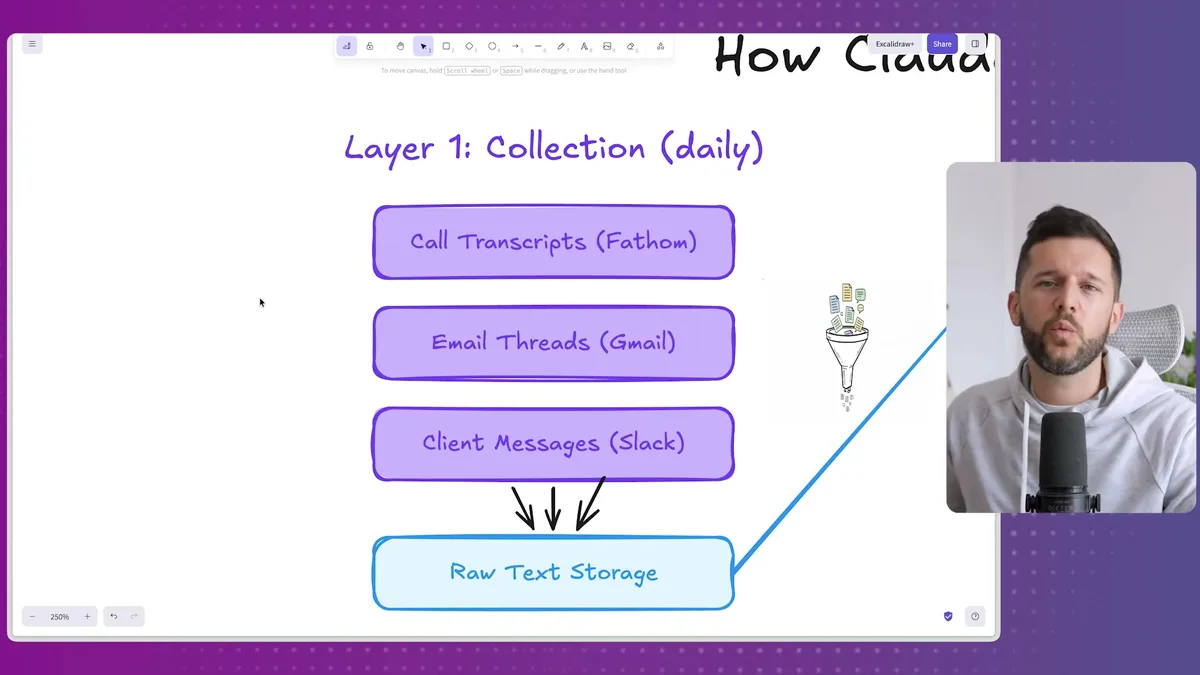
Layer one is collection.
Every tool your clients interact with has an API.
For me, that means Fathom for call transcripts, Gmail for email threads, Slack for client messages, and Stripe for payment data.
A daily automation runs and pulls the latest from each of those sources.
Everything gets saved as raw text inside my Claude Code workspace.
No processing yet, just storage.
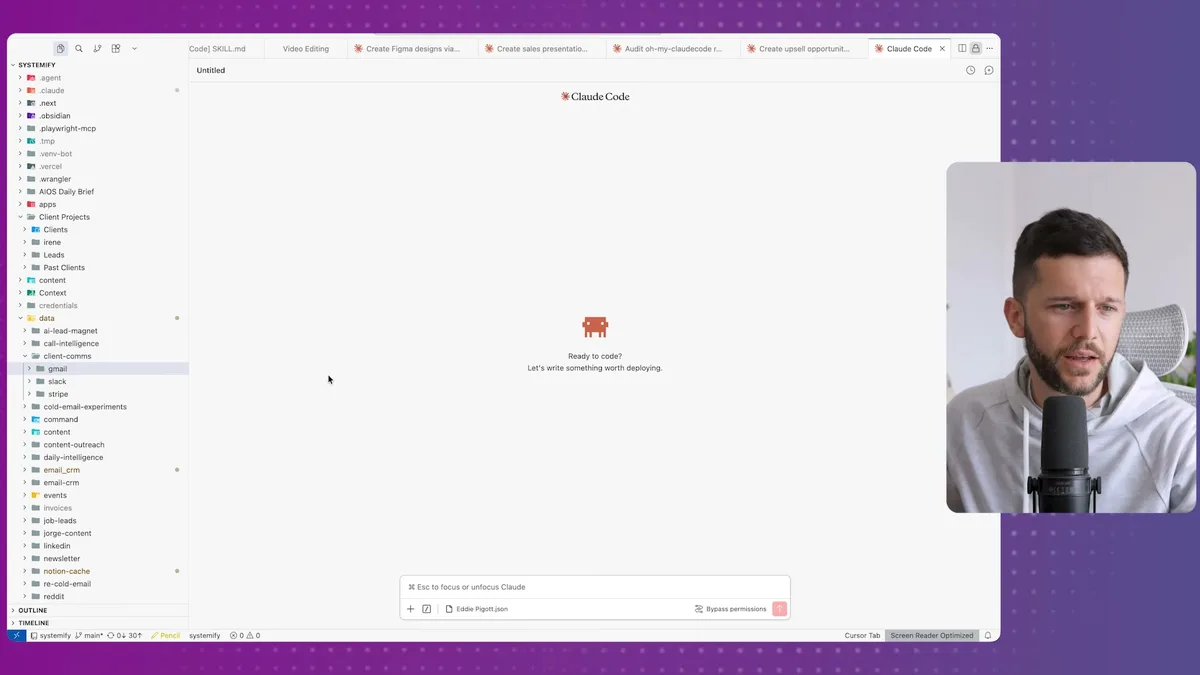
Inside the workspace you can see how it's organized.
There is a folder for client emails, a folder for Slack messages, a folder for Stripe payments, and then inside each lead, a folder with all the call transcripts for that particular client.
It is basically a structured archive of every touchpoint I have had with each person.
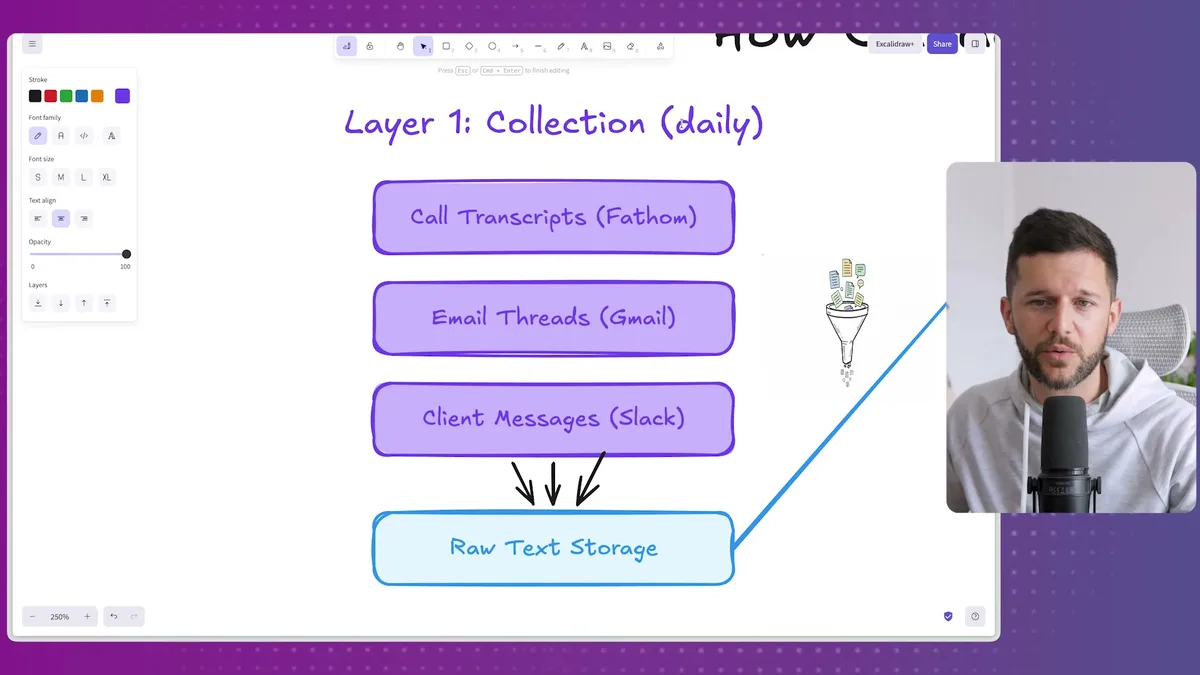
That daily automation is what keeps everything fresh.
It is not a one-time import.
It runs every day, picks up whatever is new, and adds it to the right folder.
Layer two is intelligence.
This is where the AI does the actual thinking.
Claude reads through all the raw material for a given client, transcripts, emails, messages, and extracts what matters.
Sentiment, action items, decisions made, things still pending.
Then it synthesizes all of that into what I call a client memory, which lives in a file called memory.md inside each client's folder.
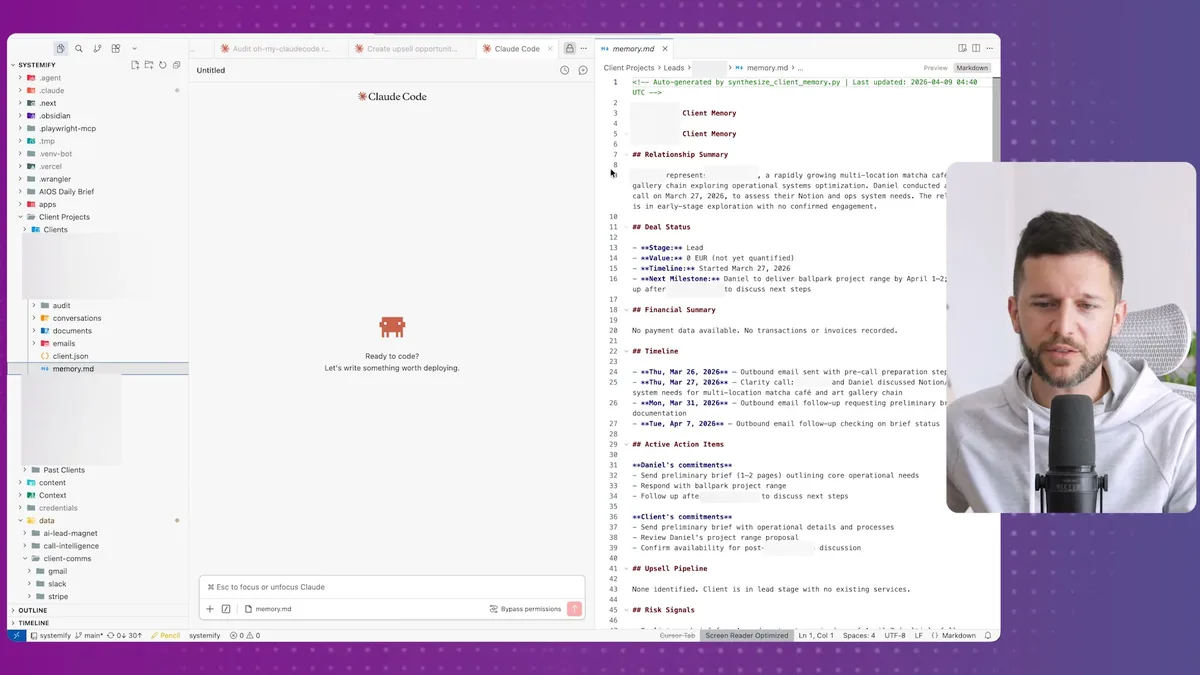
That memory file holds everything relevant about the relationship in one place.
Relationship summary, deal status, financial snapshot, timeline of key interactions, open action items.
Bear in mind, this file is not what goes into Notion.
It is the intermediate context layer that gives the next step enough information to write something useful.
Layer three is synchronization.
Once the memory is built, Claude uses it to write a tight three-line paragraph.
Current status.
What we're waiting on.
What the last action was.
That paragraph is what gets pushed into Notion.
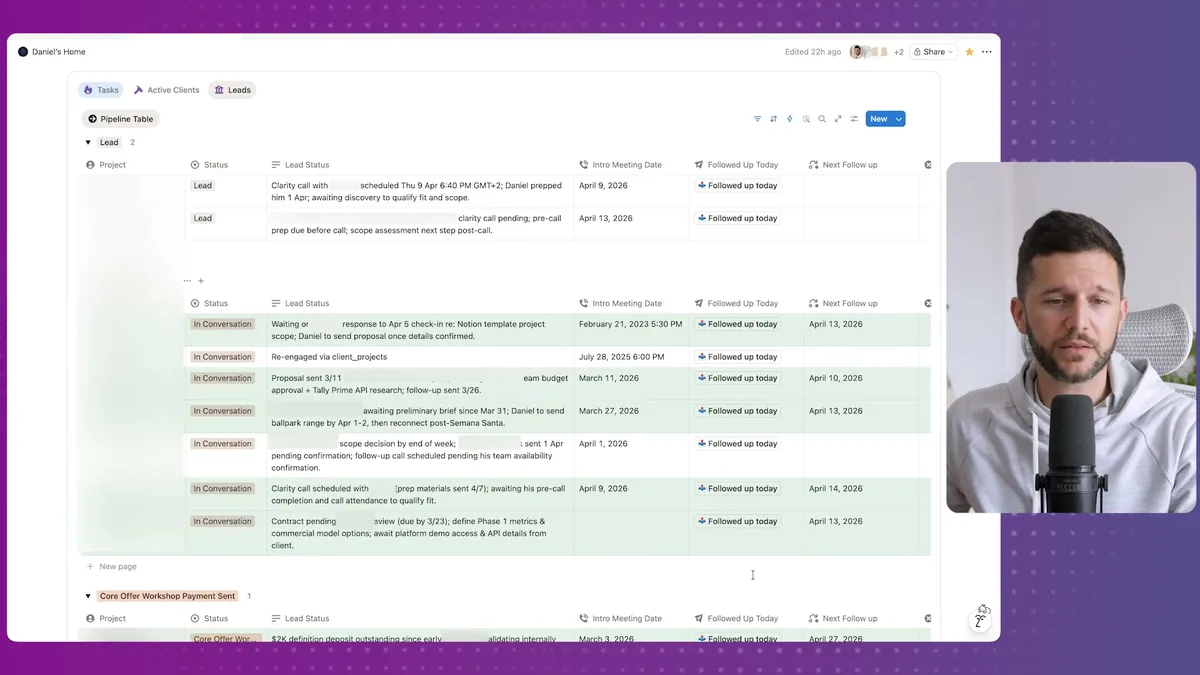
The result is a CRM entry that reads like a human wrote it, because in a sense, it was built from the actual conversations with that human.
The total API cost for running this daily across all my clients is around $3 a month.
I mean, that is because you do not need the most powerful models for tasks like this.
Summarization and synthesis work well with cheaper models, and the savings are real.
What You Can Actually Do With Synthesized Client Context
A self-updating CRM is just the beginning of what this context layer enables.
Once you have a synthesized understanding of every client relationship sitting in a structured file, you can point other workflows at it and get genuinely useful outputs.
For example, custom proposals.
The memory file knows what the client has said they need, what their budget constraints are, what objections came up on the call.
A proposal generated from that context is going to be a lot more specific than one built from scratch.
For example, financial reporting.
Because Stripe data flows into the system, you can generate a weekly or monthly summary of who has paid, who has outstanding invoices, and what the relationship context is around any slow payments.
For example, lead alerts.
The system can flag when a lead has gone quiet for too long.
If the last touchpoint was three weeks ago and nothing has moved, you get a nudge.
That is the kind of follow-up that falls through the cracks manually, and it is exactly what costs deals.
In my opinion, the real shift here is thinking about context as an asset.
Every conversation you have with a client is information.
Basically, right now that information is locked in a dozen different apps and mostly only exists in your head.
When you pull it into one place and let an AI synthesize it, you are not just updating a CRM.
You are building a foundation that every other client-facing workflow in your business can draw from.
That is what we are building for companies now, because the use cases compound quickly once the context layer is in place.
Frequently Asked Questions
Q: What tools do I need to build a self-updating CRM with Claude Code?
You need Claude Code as the processing environment, plus API access to the data sources you want to collect from. In this setup that means Fathom for call transcripts, Gmail for email, Slack for client messages, and Stripe for payments. Notion is used as the final output destination because it works well for team visibility.
Q: How much does it cost to run an automated CRM update system like this?
Running this system across a full client roster costs approximately $3 per month in API fees. That is because summarization and synthesis tasks do not require the most expensive AI models, so you can use cheaper options without sacrificing quality on the output.
Q: Does this work if my clients communicate through WhatsApp or Discord instead of Slack?
Most major messaging platforms have API access, so the same collection layer can be adapted to pull from WhatsApp, Discord, or other tools. Bear in mind that some platforms have more restrictive API policies than others, so the exact setup will depend on which tools you are using and what access they grant.
Q: What happens if I want the CRM to update more than once a day?
The daily automation frequency is just the default in this setup. You can increase the update frequency, let's say to every few hours, by adjusting the automation schedule. The API costs will increase proportionally, but given the base cost is already low, more frequent updates are still very affordable.
Ready to see where your business stands with AI and automation? Take our AI Readiness Scorecard to find out.
Get more like this in your inbox
AI implementation insights for service business founders. No fluff.